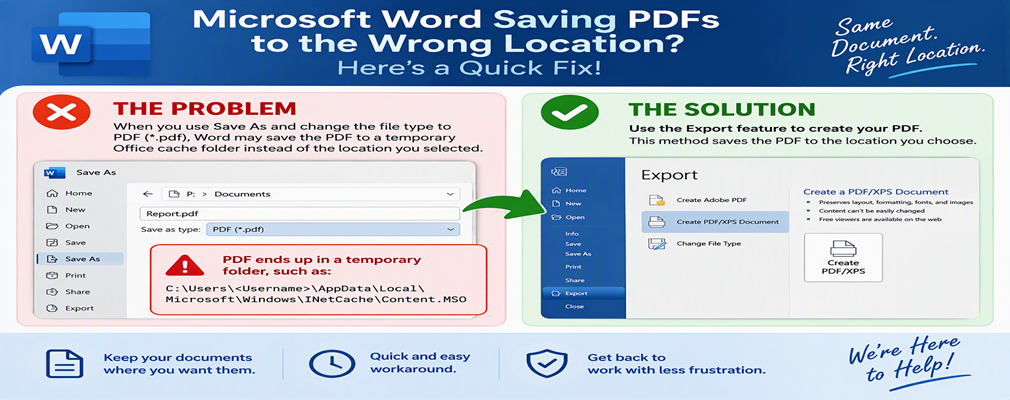
Microsoft Word Saving PDFs to the Wrong Location? Here's a Quick Fix

Have you ever tried to save a Microsoft Word document as a PDF, only to find that the PDF wasn't saved where you expected?

Recently, we've seen an issue where selecting Save As and then changing the file type to PDF (*.pdf) causes Word to save the file in a temporary Office cache folder instead of the location selected by the user. In some cases, the PDF ends up in a folder similar to:

Continue reading

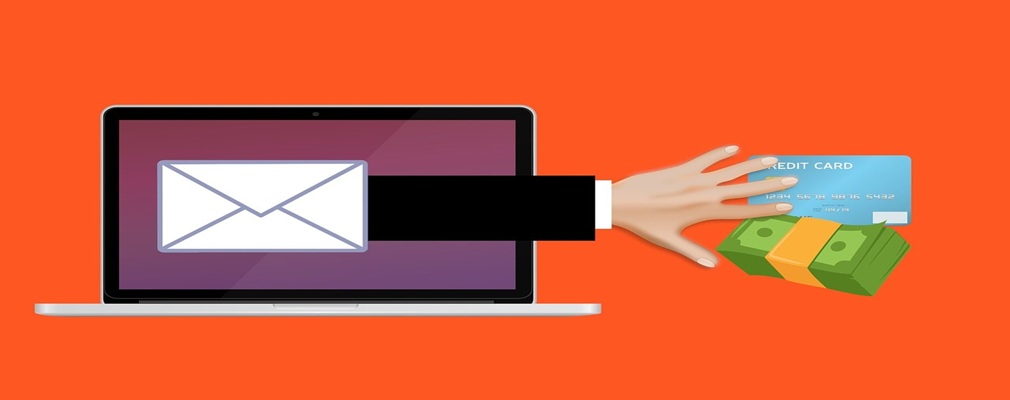
How to Protect Your Small Business from Realistic Email Scams

For years, small businesses were taught to look for poor grammar, spelling mistakes, and awkward wording to identify phishing emails. If an email looked unprofessional, it was likely a scam.

Unfortunately, that advice is no longer enough.

Continue reading

Choosing Between OneDrive and SharePoint for Your Small Business

If your small business uses Microsoft 365, you already have two powerful file storage tools available: OneDrive and SharePoint. The problem is that many small businesses aren't sure when to use each one, which often leads to files being scattered across desktops, OneDrive folders, Teams channels, and shared drives.

Over time, this can create confusion, security risks, and productivity challenges. Employees can't find the files they need, important documents become tied to one person's account, and recovering critical information when an employee leaves becomes much more difficult.

Continue reading

A Small Business Guide to Surviving a Microsoft 365 Outage

Many small businesses rely on cloud-based tools every day. Email, file storage, Microsoft Teams, accounting software, customer management systems, and payment platforms all help keep operations running smoothly.

Most of the time, these services are incredibly reliable. However, even major providers like Microsoft can experience outages. When that happens, a small business can quickly find itself unable to access emails, files, appointments, or customer information.

Continue reading

The Hidden Risks of Trusting the First Google Result for Your Small Business

When employees at a small business search Google for software, banking websites, Microsoft 365, or other business resources, it's natural to click the first result that appears. After all, if it's at the top of Google's search results, it must be the right choice, right?

Unfortunately, that's not always the case.

Continue reading

How to Tell if Your Small Business Website Is Vulnerable to Cyberattacks

For many small business owners, a website is something you build once and then rarely think about again. As long as it's online and generating leads, it seems like it's doing its job.

Unfortunately, that "set it and forget it" approach is exactly why many small business websites become cybersecurity risks.

Continue reading

A Monthly 30-Minute IT Checklist for Small Businesses

For many small businesses, technology only gets attention when something stops working. A computer won't start, files go missing, backups fail, or a cyberattack disrupts operations. By the time these problems become visible, they are often more expensive and time-consuming to fix.

The reality is that most IT issues don't appear overnight. In many cases, there are warning signs weeks or even months before a problem becomes critical. That's why every small business should set aside just 30 minutes each month for a basic IT health check.

Continue reading

How Small Businesses Can Protect Themselves from QR Code Scams

QR codes have become part of everyday business. Small businesses use them for everything from sharing documents and connecting to Wi-Fi to collecting payments and accessing online resources.

Unfortunately, cybercriminals have noticed this trend and are now using QR codes as a new way to launch phishing attacks against small businesses. This type of attack, often called "quishing" (QR code phishing), is growing rapidly and can put your employees, customers, and business data at risk.

Continue reading

How to Keep Cybercriminals from Impersonating Your Small Business by Email

For a small business, trust is everything. Your customers, vendors, and employees expect emails from your company to be legitimate. Unfortunately, cybercriminals can sometimes send messages that appear to come from your business, even when they don't have access to your email system.

This type of fraud, known as email spoofing, is one of the most common ways scammers trick customers into paying fake invoices, changing banking information, or sharing sensitive data.

Continue reading

How Small Businesses Should Respond to a Cyberattack

What Every Small Business Should Do After a Cyberattack: A Step-by-Step Guide

For a small business, a cyberattack can be overwhelming. Whether it's ransomware, a phishing scam, a compromised email account, or a data breach, the actions you take in the first hour can significantly impact how much damage is done.

The good news is that you don't need to be a cybersecurity expert to take the right first steps. Having a simple response plan can help your small business contain the threat, protect sensitive data, and recover more quickly.

Continue reading

What Small Businesses Need to Know About AI Meeting Notes and Privacy

Who Can See What Your Small Business AI Note-Taker Records?

AI note-taking tools have quickly become popular with small businesses looking to save time in meetings. Whether you're using Microsoft Teams, Zoom, or Google Meet, these tools can automatically record conversations, create transcripts, summarize discussions, and capture action items.

While AI note-takers can boost productivity, many small business owners don't realize just how much information these tools collect, where that information is stored, and who may have access to it.

Continue reading

Why Small Businesses Need to Move Beyond Windows 10

Is Your Small Business Still Using Windows 10? Here's Why It's Time to Make a Change

Many small businesses are still running Windows 10, and at first glance, everything may seem fine. Your computers still turn on, your applications still work, and employees can continue their daily tasks.

The problem is that Microsoft officially ended support for Windows 10 on October 14, 2025. That means Windows 10 no longer receives security updates, leaving small businesses increasingly vulnerable to cyber threats, compliance issues, and technology challenges.

Continue reading

What Are Passkeys, and Should Your Small Business Start Using Them?

What Are Passkeys, and Should Your Small Business Use Them?

Passwords have long been one of the biggest security risks for any small business.

Employees often reuse passwords across multiple accounts, store them in unsafe places, or accidentally enter them into convincing phishing websites. Cybercriminals know this, which is why stolen passwords remain one of the most common causes of data breaches.

Continue reading

A Small Business Owner's Guide to Understanding and Preventing Ransomware

Many small business owners assume cybercriminals focus on large corporations with deep pockets. While big companies certainly get attention, the reality is that small businesses are among the most common targets of ransomware attacks.

Why?

Continue reading

5 Microsoft 365 Settings Every Small Business Should Review

Microsoft has made significant security improvements to Microsoft 365 over the past several years. The challenge for many small businesses is that these improvements often apply only to newly created Microsoft 365 environments.

If your Microsoft 365 tenant was set up several years ago, configured by a previous IT provider, or simply hasn't been reviewed recently, you may still be operating with legacy settings that could expose your business to unnecessary security risks.

Continue reading

How Small Businesses Can Answer Cyber Insurance Questions Without Risking Coverage

Cyber insurance renewals have become more challenging for small businesses in recent years. If your renewal application seems longer and more detailed than it did a few years ago, you're not imagining it.

Insurance carriers have added new questions about backups, multifactor authentication (MFA), cybersecurity monitoring, vendor security, and wire transfer procedures. These questions are designed to evaluate whether a small business has the safeguards needed to reduce cyber risk and recover quickly from an attack.

Continue reading

What Small Business Owners Need to Know About Immutable Backups on Cyber Insurance Applications

If you're a small business owner renewing your cyber insurance policy, you've probably noticed a question that wasn't common a few years ago:

"Do you maintain immutable, air-gapped, or offline backups of your critical business data?"

Continue reading

Before You Deploy Copilot: The Microsoft 365 Permission Check Every Small Business Needs

Microsoft 365 Copilot is one of the most powerful productivity tools available to small businesses today. It can summarize emails, search across company files, generate reports, answer questions, and help employees work faster.

But before a small business rolls out Copilot, there's something important to understand:

Continue reading

Bad Onboarding Today Creates Bigger Problems Tomorrow

For many small businesses, employee offboarding feels like a stressful scramble. Access needs to be removed, equipment collected, client relationships reassigned, and company information secured. When the process takes days—or even weeks—it's easy to blame the employee's departure.

In reality, most offboarding problems begin long before an employee submits their resignation. They start during onboarding.

Continue reading

Why Everyday Habits Are the Biggest Security Risk for Small Businesses


Why Everyday Habits Are a Hidden Security Risk for Small Businesses

Article Summary:
For many small businesses, cybersecurity risks don’t come from sophisticated hackers—they come from everyday habits. Checking personal email at work, reusing passwords, or using familiar apps can unintentionally expose business data. The most effective approach for small businesses is to put simple guardrails in place, use stronger defaults, and train people in a practical way—rather than trying to lock everything down.

Continue reading