Microsoft Word Saving PDFs to the Wrong Location? Here's a Quick Fix
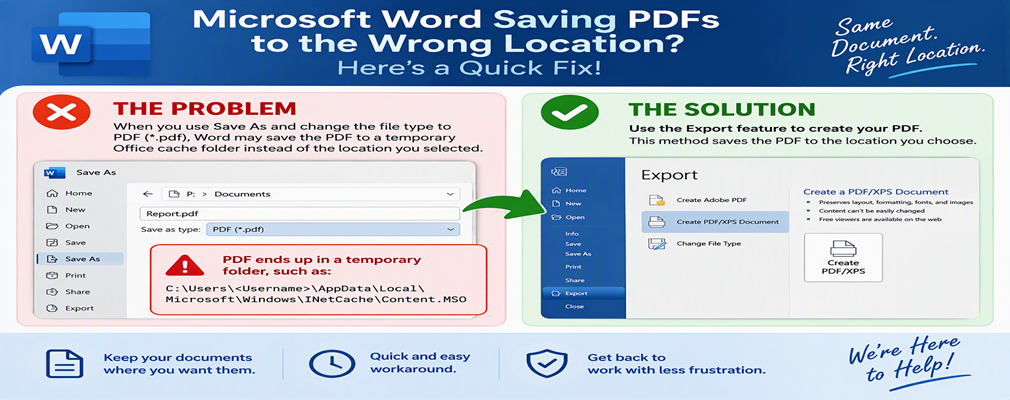
Have you ever tried to save a Microsoft Word document as a PDF, only to find that the PDF wasn't saved where you expected?
Recently, we've seen an issue where selecting Save As and then changing the file type to PDF (*.pdf) causes Word to save the file in a temporary Office cache folder instead of the location selected by the user. In some cases, the PDF ends up in a folder similar to:
C:\Users\<Username>\AppData\Local\Microsoft\Windows\INetCache\Content.MSO
This can make it appear as though the PDF was never created or has gone missing.
The Quick Workaround
Rather than using Save As and changing the file type to PDF, use the Export feature built into Microsoft Word.
Steps:
- Open your Word document.
- Click File.
- Select Export.
- Click Create PDF/XPS Document.
- Click Create PDF/XPS.
- Choose your desired save location.
- Click Publish.
The PDF should now save normally to the folder you selected.
Why Does This Happen?
This behavior appears to be related to Word's PDF export process in certain situations. While the document itself saves correctly, the PDF generated through the traditional Save As → PDF method may be redirected to an Office cache folder.
Using Export → Create PDF/XPS Document bypasses this issue and creates the PDF correctly.
Need Help?
If you or your employees are experiencing issues saving Word documents as PDFs, Tech Up To Date can help diagnose the problem and implement a reliable solution.
Contact us for assistance with Microsoft 365, Microsoft Office, file sharing, document management, and everyday IT support for your business.